
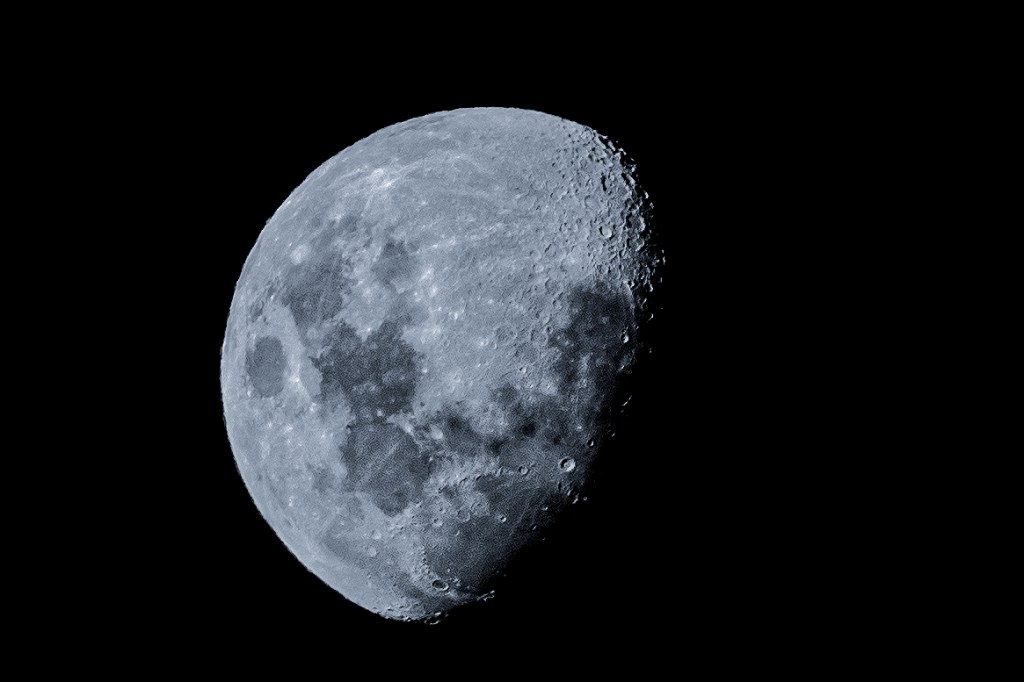

I love the moon when it is not quite full. When it’s full it simply looks like a disc when you take a photo of it. But when it’s not quite full you get a more 3D feel of if. You can see the start of the dark side of the moon. Tonight was a nice night so I wandered outside and was admiring the moon once again and decided to take a few shots. I got a few clear photos, but this one especially came out clear. So I decided to see if I could make it look even clearer. With a bit of tweaking in Photoshop I was able to bring out this crisp looking photo. I love how the craters are really popping out, especially the one in the dark patch at about 4 o’clock. You may think getting a photo like this is very hard. But if you have a camera with manual settings, simply set the shutter speed to 100. The ISO to 100 and the aperture to f/8. Then zoom in as close as you can, focus on the moon and start there. You’ll be surprised how easy it is. Once you upload your photo, simply start with some cropping and tweak it from there. One of the first things I did to the shot above was convert it to Black and White. I know that sounds weird, but it really brought out the whites and monotone shades. So give it a go. Try the moon at different phases and experiment away!






 Wander -Explore - Discover
Leave a comment